Autonomous Mobile Robots: Operations, Management, and Automation
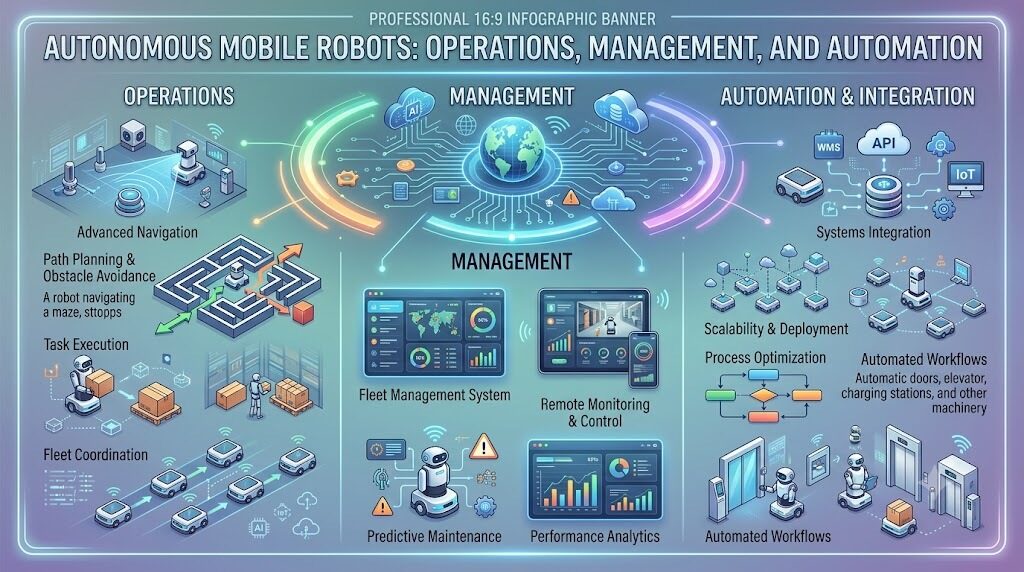
Picture two companies. Both buy fifty warehouse robots on the same day. Six months later, one company runs smoothly. The other struggles with constant breakdowns, confused staff, and unhappy customers. What made the difference? Not the robots. Both companies bought the exact same hardware. The difference was RobotOps — how one team chose to operate, monitor, and maintain their fleet, and how the other team didn't. Let's walk through what separates these two outcomes, point by point.
Company A Has No Operational Plan
At Company A, robots got switched on and left alone. No one tracked software versions. No one watched battery health. When a robot stopped working, someone would notice hours later — usually because a shipment was late.
This is what happens without RobotOps: a robot gets treated like a fixed asset, not a living system. It runs software, connects to a network, and generates data just like any app does. But no one is managing that side of it.
Small issues built up. A missed update here. A drifting sensor there. Nothing seemed urgent on its own. But together, they slowed the whole warehouse down.
Company B Built RobotOps Into Their Process
Company B did things differently from day one. Their team treated robot management the way software teams manage applications — with structure, monitoring, and clear processes. This covered five main areas:
Getting software onto robots correctly. Every robot ran the same tested version. No robot was left running outdated or mismatched software.
Watching robots in real time. The team tracked battery levels, error logs, and task progress constantly. Small issues got caught before they became failures.
Automating repeat tasks. Restarting stuck processes, scheduling charging, applying routine patches — all handled automatically, instead of eating up engineer time.
Responding fast when things broke. When a robot did stop responding, the team had a clear process to diagnose it quickly, and they logged what happened to prevent repeats.
Planning for the robot's full life. They didn't just think about day one. They planned for upgrades, replacements, and eventual retirement from the start.
This is the core of RobotOps: treating robots as ongoing systems that need continuous care, not machines you install and forget.
Why One Robot Is Easy, But Fifty Are Hard
Managing a single robot by hand is simple. Anyone can check its battery once a day. The real challenge starts when fleets grow.
Company A learned this the hard way. With fifty robots, no one could manually inspect each one every day. Problems that would've been minor at a smaller scale turned into real downtime at fifty robots.
Company B avoided this by building robot fleet management into their operations from the start. This meant controlling and monitoring many robots from one central system, instead of managing each robot separately. Their setup included:
- Central monitoring — one dashboard showing every robot's status
- Telemetry — real-time data on location, battery level, and task status
- Remote operations — adjusting robots without physically walking over to them
- Predictive maintenance — spotting warning signs before a robot actually breaks down
- Staged rollouts — updating a small group of robots first, then expanding once it's confirmed safe
- Incident tracking — logging failures across the fleet to spot repeat problems
Because of this, Company B's team started noticing patterns Company A never saw. For example, a specific robot model tended to fail after a certain number of operating hours. Catching that early meant fixing it before it spread across the fleet.
The Difference a Control Room Makes
As Company B's robot fleet grew across multiple warehouse locations, they set up something called a Robotics Operations Center — a dedicated space, similar to a control room IT teams use, where staff watch fleet activity in real time.
This center focused on:
- Tracking live data from every robot across every site
- Monitoring how the fleet performed overall
- Managing how software updates rolled out
- Coordinating a fast response when a problem hit multiple robots at once
Company A had no equivalent. When a software bug affected several robots at once, no one connected the dots until customers started complaining.
What's Actually Running Inside Each Robot
Every robot, at both companies, depended on the same basic software layers:
- Perception systems, which process data from cameras and sensors
- Navigation software, which helps the robot move without collisions
- Middleware, which connects these different parts so they can communicate with each other
Middleware rarely gets attention, but it's the backbone holding a robot's software together. Without it, engineers would need custom connections between every single component. Company B's engineers understood their middleware well. Company A's team barely knew it existed until something broke.
Where ROS 2 Fits Into the Picture
Both companies' robots ran on ROS 2, short for Robot Operating System 2. Despite the name, it isn't a full operating system like Windows or Linux — it's a toolkit that helps different parts of a robot's software talk to each other.
ROS 2 lets developers:
- Break robot software into smaller, manageable pieces
- Move data reliably between those pieces
- Reuse existing tools instead of building everything from scratch
Company B's engineers understood how their ROS 2 setup behaved, which made troubleshooting fast. Company A's team had never looked closely at it, so every failure took longer to diagnose.
The Step Company A Skipped: Simulation
Here's one of the biggest gaps between the two companies. Company A tested new software directly on live robots in the warehouse. When a bug caused a robot to move incorrectly, it damaged shelving and delayed operations for a full day.
Company B never let that happen, because they always tested first in robot simulation — a virtual environment where engineers could:
- Test robot behavior before it touched real hardware
- Debug issues without any risk to physical equipment
- Confirm updates worked before rolling them out
- Recreate rare or dangerous situations safely
For Company B, simulation was a required checkpoint. If something failed there, it never reached an actual robot.
Watching the Mobile Robots Move
Both fleets used autonomous mobile robots (AMRs) — robots that move through the warehouse without a fixed track, using sensors to navigate around people and obstacles.
Running AMRs well requires:
- Navigation software that adjusts as the environment changes
- Sensors that reliably detect obstacles
- Coordination so robots don't block or collide with each other
- Constant monitoring to catch robots that get stuck or lose their path
Company B's AMRs rarely got stuck, because the team caught navigation errors quickly through monitoring. Company A's AMRs sometimes sat frozen in an aisle for hours before anyone noticed.
Automation Beyond the Warehouse
The same principles that separated these two companies apply across industries wherever robotics automation is used:
- Manufacturing — robotic arms handling repetitive jobs like welding and assembly
- Logistics — AMRs moving goods between storage and shipping areas
- Healthcare — robots delivering supplies within hospital buildings
In every case, the robot is only half the story. The operational layer behind it — monitoring, updates, fast fixes — decides whether automation actually works or causes more problems than it solves.
The Challenges Neither Company Could Fully Avoid
Even Company B, with strong RobotOps practices, ran into real challenges:
- Scattered tools — different systems for monitoring, deployment, and fleet management that didn't always work well together
- Unreliable connectivity — patchy network coverage in parts of the warehouse made remote monitoring harder
- Version mismatches — robots running different software versions sometimes behaved unpredictably
- Safety limits — every update had to be checked to make sure it never put warehouse staff at risk
The difference wasn't that Company B avoided these problems entirely. It's that they had a process ready to handle them.
What Made Company B Successful
A few consistent habits stood out:
- They tested in simulation before anything touched a real robot
- They monitored constantly, not just when something felt wrong
- They automated repetitive work instead of relying on manual checks
- They rolled out updates gradually, starting small before going fleet-wide
- They documented every incident, so failures didn't repeat
FAQs
What's the real difference RobotOps makes for a business?
It's the difference between catching small problems early and dealing with major downtime later. Companies with strong RobotOps practices avoid breakdowns that come from neglected monitoring and updates.
Can a small robotics team benefit from RobotOps, or is it only for large fleets?
Small teams benefit too. The core principles — monitoring, automation, gradual updates — apply at any scale, even with simpler tools than a large operations center would use.
Why does fleet management matter more as robot numbers grow?
Manual checks work for one or two robots but break down past that point. Fleet management gives teams a central system to track and coordinate many robots at once.
What happens if a company skips simulation testing?
Untested software goes straight to real robots, risking collisions, equipment damage, or halted operations — exactly the kind of costly mistake simulation is meant to prevent.
Is ROS 2 necessary for every robotics fleet?
No. It's a widely used middleware framework, but RobotOps principles apply regardless of which software stack a fleet runs on.
How does predictive maintenance actually save time and money?
It flags a robot likely to fail based on data trends, letting teams service it on their own schedule instead of dealing with an unexpected breakdown.
What's the biggest mistake companies make with robot fleets?
Treating robots as "install and forget" hardware instead of ongoing systems that need continuous monitoring, updates, and care.
Conclusion
The hardware wasn't what separated these two companies. The robots were identical. What separated them was RobotOps — the ongoing discipline of deploying, monitoring, automating, and maintaining robots as living systems. As robot fleets keep growing, this difference only gets bigger. Whether you're managing five robotic arms or a hundred autonomous mobile robots, the same lesson holds: robots need active, continuous care to keep working the way they're supposed to.